
NEON Starting Guide
Online Configurator
Table of contents
All NEON devices are configurable via LoRa downlinks which can be generated using the NEON Online Configurator . Select the product type and the protocol version and click Open, prompting a new tab to display the available settings for the selected device.
If you are uncertain of the protocol version please refer to Communication Protocol
Depending on the device type and the protocol the configurator can consist of several tabs. The configurator is tabs-sensitive, therefore the user must click the Encode button and send a downlink for every set of options they want to set up.
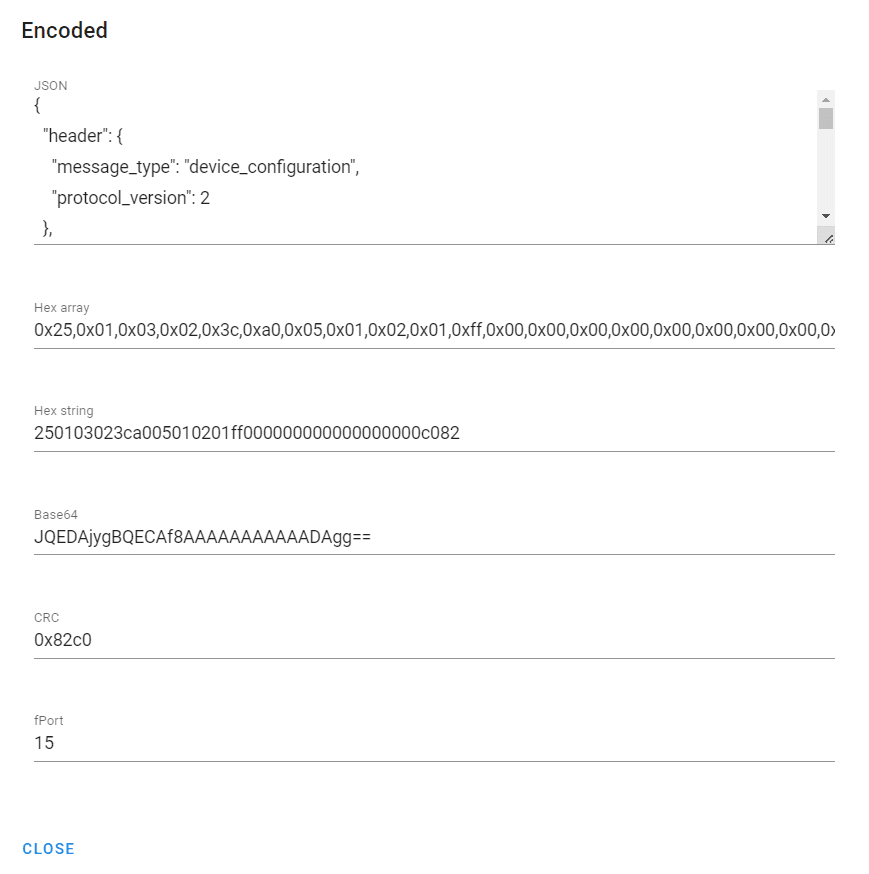
After clicking Encode a pop-up will appear with the following information:
JSON: JSON structure of the downlink message with the configured settings.
Hex array: Encoded hex array of the downlink message.
Hex string: Encoded hex string of the downlink message.
Base64: Encoded base64 string of the downlink message.
CRC/tag: A number to confirm the device's configuration. For devices with CRC, it is the cyclic redundancy check calculated over the configuration. For devices with a tag, it is a 32-bit value that the user can label the configuration with, e.g. a version number or the time (seconds since Unix epoch).
fPort: Number of the fPort to send the downlink in the LNS.
An example of the pop-up is displayed below.